Start with a lead funnel that does not exaggerate
A person landing on an SEO service page is a visitor, not necessarily a prospect. A tap on a telephone number shows an attempted call, not a connected call. A WhatsApp button may open an app, but it does not prove a message was sent. A form button press can fail validation or the network. Even a successfully delivered form may be spam or a request outside your service area.
Define separate events for intent, accepted submission, qualification and a closed customer outcome. This distinction protects your reporting from overclaiming and helps teams debug where real opportunities are being lost.
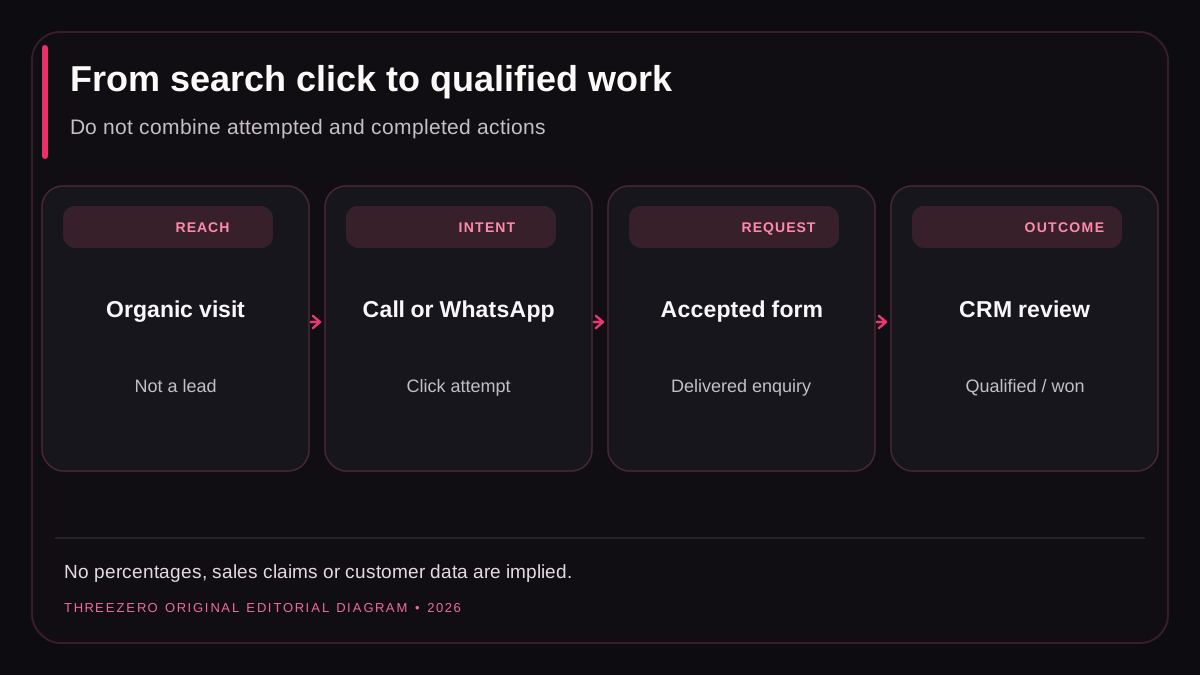
A practical analytics event dictionary
| Observed action | Suggested event | Evidence and limitation |
|---|---|---|
| Telephone link clicked | click_to_call | Intent to start a call, not call answered |
| WhatsApp URL clicked | whatsapp_click | External app handoff, not sent message |
| Backend accepts a form | generate_lead | Contact request delivered, not qualified |
| CRM marks a prospect suitable | qualify_lead | Qualified according to documented rules |
| Agreement completed | close_convert_lead | Customer outcome after verification |
Google Analytics 4 recommends generate_lead, qualify_lead and close_convert_lead for appropriate lead stages. Custom names such as click_to_call are design choices, not Google-required events. See GA4 recommended events and the developer event reference.
Implement a click without blocking the destination
Track a real user click on an anchor starting with tel: or the authorized wa.me URL. Keep the browser's natural navigation working even if an analytics endpoint is blocked, slow or offline. Prefer event delegation so the handler continues working when a CMS re-renders a navigation item. Label only non-sensitive context such as contact channel or a coarse page category.
Never send full phone numbers, email addresses, message text or contact-form fields to GA4. Respect regional privacy and consent requirements. Query-string analytics labels should not include personal contact data. A business phone provider may offer authorized call outcomes, but browser-side click tracking alone cannot tell whether a human answered.
Fire lead events after confirmed form success
Many implementations incorrectly fire a conversion when the submit button is pressed. That counts invalid forms, network errors and retries as leads. Send the accepted-lead event only after the authorized backend or form provider confirms delivery, and suppress duplicate events for the same successful request.
// Illustrative pseudocode, not a drop-in production integration.
const response = await sendLeadToApprovedBackend(formData);
if (!response.ok) throw new Error('Submission failed');
showSuccessMessage();
if (analyticsConsentGranted() && typeof gtag === 'function') {
  gtag('event', 'generate_lead', { lead_source: 'website_form' });
}
Functions in this example are placeholders. A real implementation needs server verification, spam resistance, duplicate protection, retry handling and a clear error message. Test a genuine inbox delivery instead of assuming that a 200 browser response guarantees the recipient received mail.
Search Console and GA4 answer different questions
Search Console reports Google Search impressions and clicks according to search measurement rules. GA4 measures activity that your website sends under its analytics setup and consent conditions. The totals will not match perfectly because attribution, processing, browsers and privacy choices differ. Never subtract one total from another and present the result as “lost leads.”
Start with landing pages: which organic pages reach real customers, and which paths reliably produce qualified enquiries? Keep the CRM outcome separate from the acquisition estimate. A customer may search on one device and later call from another; this uncertainty should appear in reporting notes. Our GSC click diagnostic covers the top-of-funnel distinctions.
Ten release checks for an honest lead report
- Submit a form without mandatory fields: no success event should fire.
- Simulate a disconnected network: visitors see an error, not a fake success.
- Submit one valid enquiry: count one confirmed acceptance.
- Double-click submit: verify duplicate prevention.
- Test call and WhatsApp links on a real mobile device.
- Ensure the number behind the click actually reaches the business.
- Verify analytics payloads exclude names, emails and message text.
- Reject analytics consent and confirm the form still works.
- Reconcile accepted requests against the authorized inbox or CRM.
- Label offline and cross-device attribution gaps instead of guessing.
Choose a weekly scorecard with distinct columns for organic clicks, contact attempts, confirmed submissions, qualified enquiries and won business. That structure helps diagnose failure without turning every click into a customer claim. See marketing automation services or discuss an implementation audit.